
Ever run into a problem in Hey Subtitle and had to wait a full day for an email reply? Starting today, we've added live chat support — type your question and a real team member replies directly, no more waiting on email.
Instant Replies
No more waiting on email — open the chat window any time you have a question.
Real People
Our support team answers in person, matched to your actual situation — not a scripted bot.
More Peace of Mind
Whenever something's unclear while using Hey Subtitle, a real person has your back.
Get Started in 3 Steps
Step 1 | Click the Chat Icon in the Corner
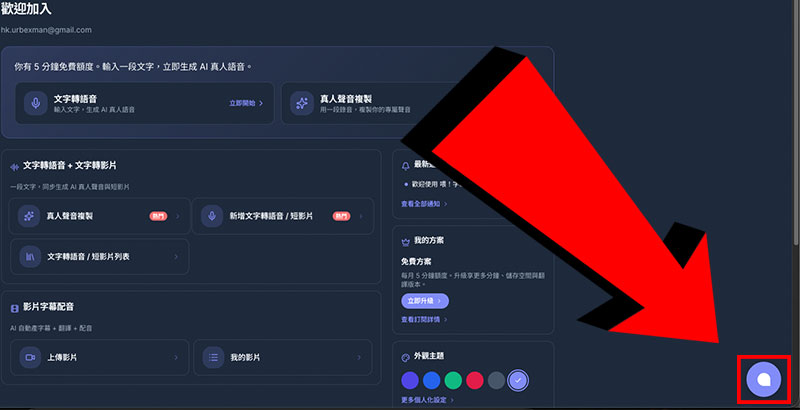
On any page in Hey Subtitle, you'll see the chat icon in the bottom-right corner — click it to open the live chat window.
Step 2 | Type Your Question and Send
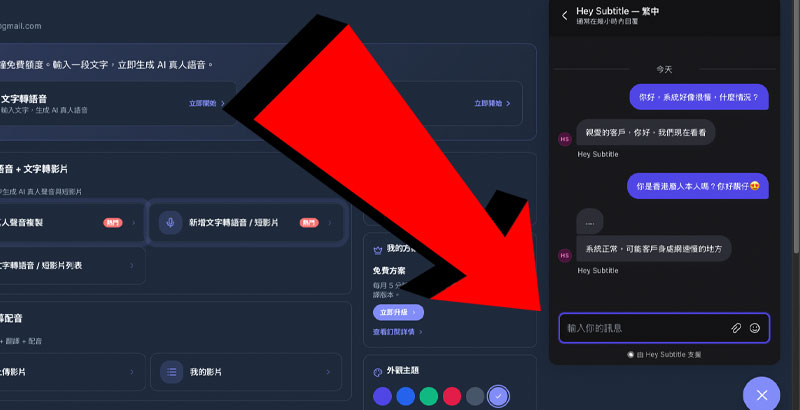
Type your question in the input field and hit send. Our support team is notified instantly and replies directly in the conversation — no waiting on email.
Step 3 | Wait for a Reply
We reply as quickly as we can. Even if you leave the page while waiting, your message stays in the conversation history for when you come back — and if you're logged in, we'll also email you when there's a new reply.
Your Message Doesn't Disappear When Chat Is Briefly Unreachable
If live chat is temporarily unavailable, the page automatically shows an email form for your name, email, and message — we'll still get back to you as soon as we can.
Multiple Languages Supported
Live chat supports Traditional Chinese, Simplified Chinese, English, and Japanese — ask in whichever language you're most comfortable with, and the interface follows your language setting automatically.